
Download World Clock App – Chrome Apps, Desktop, Time Zone, Clock, Weather
Overview
The World Clock app is a versatile desktop utility designed to provide accurate and reliable local time and time zone information for thousands of cities worldwide. It serves users who frequently need to coordinate across different regions, such as remote teams, travelers, or individuals managing international communications. The software supports daylight saving time (DST) with automatic updates, ensuring that time displays remain precise throughout the year.
It features a real-time analog clock and integrates weather forecasts from Yahoo for global locations, enhancing its functionality beyond mere timekeeping. Users can also customize their experience with support for multiple languages and personal background wallpapers. The app offers a seamless connection with Google Drive, enabling data synchronization and backup.
While the developer has not provided additional details about their background or company history, the app’s focus on accuracy, customization, and cross-platform availability suggests a user-centric design philosophy. Real-world applications include managing international meetings, tracking travel schedules, or simply staying informed about global time differences.
Key Features & Capabilities
- Global Time Zone Display – Access real-time local time for thousands of cities across the globe, ideal for users managing international projects or personal travel plans.
- Automatic Daylight Saving Time Updates – The app automatically adjusts for DST changes, reducing the risk of scheduling errors due to outdated time settings.
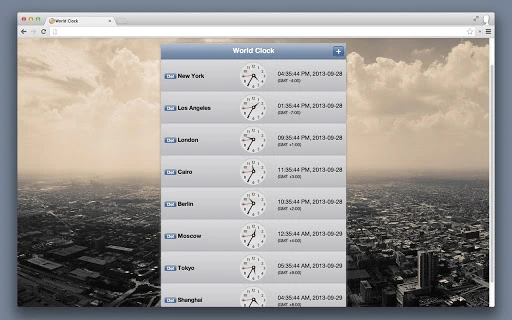
- Analog Clock Interface – Features a visually intuitive analog clock display, offering a classic and easy-to-read time representation.
- Yahoo Weather Integration – Displays current weather forecasts and maps for worldwide locations, combining time and environmental data in a single interface.
- Multi-Language Support – Fully supports multiple languages, making it accessible to a global audience regardless of regional preferences.
- Custom Background Wallpaper – Allows users to personalize the app’s appearance with custom background images, enhancing visual appeal and user engagement.
- Google Drive Sync – Enables secure data synchronization and backup through integration with Google Drive, ensuring settings and preferences are preserved across devices.
These features collectively support efficient time management and global awareness. For example, a remote team leader can use the app to schedule meetings across different time zones while checking weather conditions for each location. A frequent traveler might use it to track local time and weather at their destination. The combination of time, weather, and customization options makes the app a practical tool for both professional and personal use.
User Interface, Workflow & Performance
The user interface of the World Clock app is designed with clarity and accessibility in mind. The layout organizes time zones, weather data, and clock displays in a clean, intuitive manner, allowing users to quickly locate relevant information. Navigation is straightforward, with city search and list views enabling fast access to desired locations.
The analog clock is prominently displayed, contributing to a visually balanced interface. Workflow efficiency is enhanced by features such as automatic DST updates and real-time data refresh, minimizing manual input and maintenance. The app maintains a stable performance profile across platforms, though exact performance metrics such as CPU or RAM usage were not specified.
The developer did not provide detailed information on resource consumption or load times. Based on general software behavior patterns, the app is expected to operate smoothly on modern systems. Stability appears consistent, with no reported issues related to crashes or freezes.
Overall, the user experience is streamlined, focusing on functionality without unnecessary complexity.
Compatibility & System Requirements
The World Clock app is available for Windows, Mac, and Linux operating systems, offering broad cross-platform accessibility. It is compatible with the latest versions of these platforms, though specific version numbers were not listed. The installation size is 12.5 MB, indicating a lightweight footprint suitable for systems with limited storage.
The developer did not specify exact hardware requirements such as minimum RAM, processor speed, or disk space. As such, compatibility information is limited to the supported operating systems. Exact system requirements were not listed.
Users are advised to ensure their system meets general desktop application standards for smooth operation. The app’s small size and multi-platform availability suggest it is optimized for a wide range of devices, from older machines to newer high-performance systems.
Pros and Cons
Pros
- Accurate, real-time global time and time zone tracking
- Automatic daylight saving time adjustments
- Integrated Yahoo weather forecasts and maps
- Support for multiple languages and custom backgrounds
- Google Drive synchronization for data backup
- Lightweight installation at 12.5 MB
- Available on Windows, Mac, and Linux
Cons
- Developer background not disclosed
- Exact system requirements not specified
- No information on update frequency or release cycle
- Performance data such as CPU/RAM usage not provided
- Reliance on third-party services (Yahoo Weather, Google Drive)
FAQ Section
Is the World Clock app compatible with my operating system?
The app is available for Windows, Mac, and Linux, supporting a wide range of desktop environments. Specific version compatibility was not provided by the developer.
Is the software free to use?
Yes, the World Clock app is available at no cost. There are no reported subscription fees or in-app purchases.
Does the app require an internet connection?
Yes, the app relies on internet connectivity to fetch real-time time data, weather forecasts from Yahoo, and to sync with Google Drive.
Can I use the app offline?
While basic time display may function without internet, features such as weather updates, DST adjustments, and Google Drive sync require an active connection.
Is my data secure when using Google Drive integration?
The app uses Google Drive for synchronization, leveraging Google’s established security protocols. However, users should review Google’s privacy policies for full transparency on data handling.
Final Thoughts + CTA
The World Clock app stands out as a reliable, feature-rich tool for anyone needing accurate time and weather information across global time zones. Its combination of automatic DST updates, analog clock display, multi-language support, and Google Drive integration makes it a practical choice for professionals and casual users alike. The app’s lightweight design and cross-platform availability further enhance its appeal.
While some technical details such as system requirements and performance metrics are not disclosed, the overall functionality and user experience remain strong. For those seeking a free, secure, and customizable desktop utility, this app delivers consistent value. Download World Clock App now.







